何ができるか
- Microsoft Entra ID のサインインログから条件付きアクセスの評価結果を一覧で確認できる。失敗 / 未適用 / 非準拠許可 / レポートモード判定 / ゲストアクセスを観点別に絞り込めます。
- HTML レポートとして出力できる。Summary・Assessment・3 軸集約表 (ユーザー別 / アプリ別 / ポリシー別) を 1 つの HTML にまとめ、上司・監査・運用担当への共有に使えます。
- ローカル端末のみで動作、外部送信なし。Microsoft Graph 以外には接続せず、UPN 平文を DB に保存しません。
What it does
- Lists Conditional Access evaluation results from Microsoft Entra ID sign-in logs. Filter by aspect: failures, not-applied, non-compliant allowed, report-only judgments, guest access, and more.
- Exports an HTML report. Summary, Assessment, and 3-axis aggregation (by user / by app / by policy) in one HTML file — ready to share with managers, auditors, and operations.
- Local-only operation, no external transmission. Connects only to Microsoft Graph. Plain UPNs are not stored in the database.
こんなときに役立ちます
条件付きアクセスの設定が正しく適用されているか確認したい
実際のサインインログから、想定どおりに評価されたか・抜けがないかを観点別に絞り込んで確認できます。
レポートモードの影響範囲を確認したい
本番化する前に、どの利用者・アプリ・サインインに当たっているかを実ログで確認できます。
設定漏れの利用者やリソースを見つけたい
ポリシー未適用のサインインを抽出し、漏れているユーザー・アプリ・端末状態を特定できます。
Entra ID のログでは見づらい情報をまとめて確認したい
詳細ペインを 1 件ずつ開かなくても、適用ポリシー・端末状態・許可拒否理由を一覧で確認できます。
When this helps
You want to confirm Conditional Access policies are actually applied as intended
Filter real sign-in logs by aspect to see whether each policy evaluated as expected — and where there are gaps.
You want to see the impact of report-only policies
Before promoting to production, check exactly which users, apps, and sign-ins are affected.
You want to find users or resources that slipped through
Pull up sign-ins where no policy was applied and identify the missed users, apps, and device states.
You want to see information that's hard to read in Entra ID sign-in logs
Without opening the detail pane row by row, see applied policies, device state, and allow/deny reasons in a single list.
どんな人向けか
🛡️ Entra / M365 管理者
条件付きアクセスポリシーが意図通り効いているかを定期的に確認したい。失敗・未適用・非準拠許可をすばやく見つけたい。
📋 監査・コンプライアンス担当
監査・内部統制報告のために、サインインログから CA 評価結果を抽出して、HTML レポートとして証跡を残したい。
🔍 セキュリティ運用担当
Entra portal の Sign-in Logs を毎日見るが、CA 関連だけを切り出した運用判断レポートを現場で作りたい。
Who it's for
🛡️ Entra / M365 administrators
You want to regularly verify that Conditional Access policies are working as intended, and quickly spot failures, not-applied, or non-compliant allowed access.
📋 Audit / compliance officers
You need to extract CA evaluation results from sign-in logs for audits and internal-control reports, and keep evidence as an HTML report.
🔍 Security operations
You browse the Entra portal Sign-in Logs daily, and want a focused operational report covering only Conditional Access — built on the spot.
おすすめの使い方
-
ホームで「今日見るべきもの」を確認
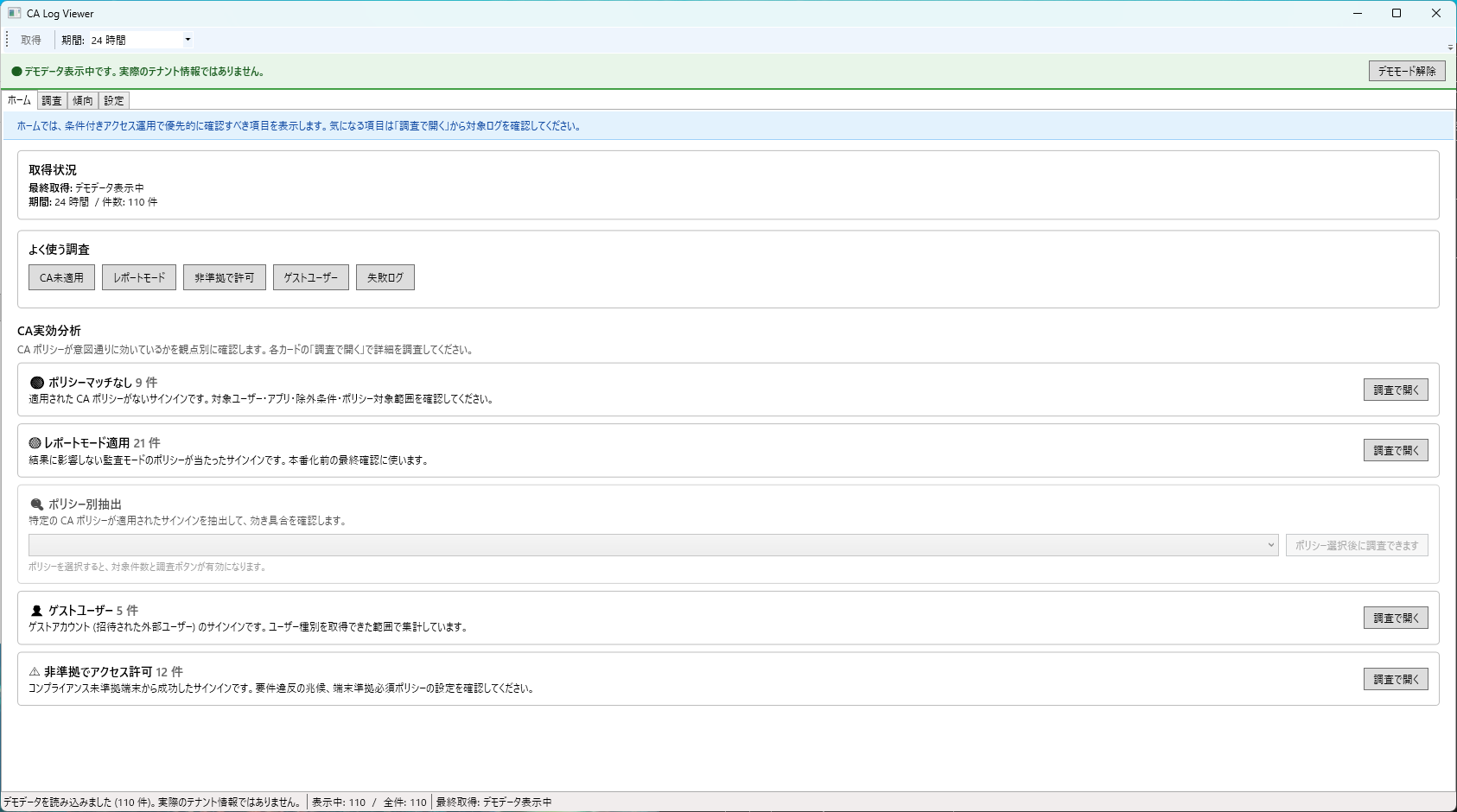
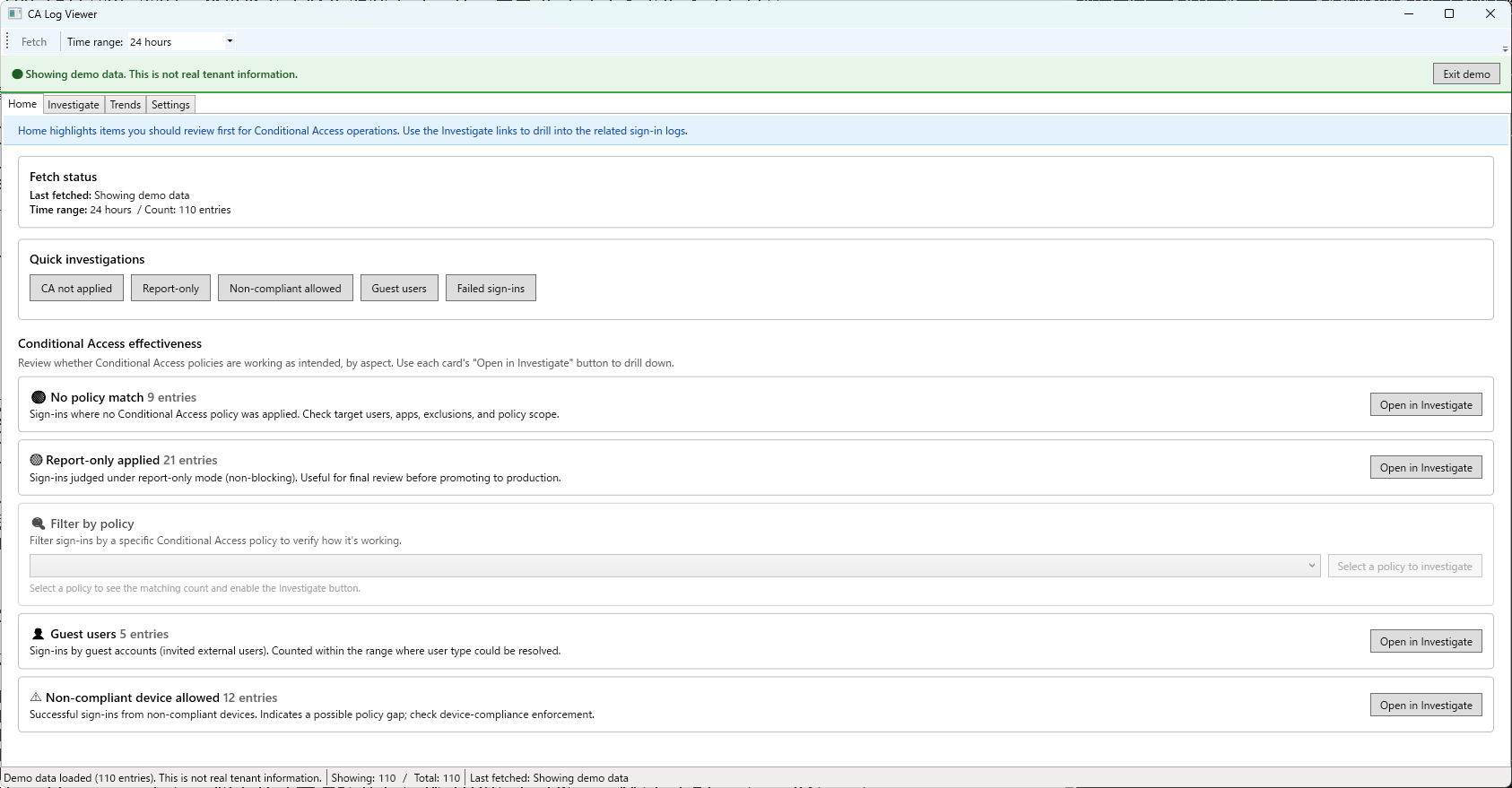
異常検知バナーと、よく使う調査ボタン (CA 未適用 / レポートモード / 非準拠で許可 / ゲスト / 失敗ログ) で、その日の対象を絞り込みます。
-
非準拠・未適用・レポートモードを順に確認
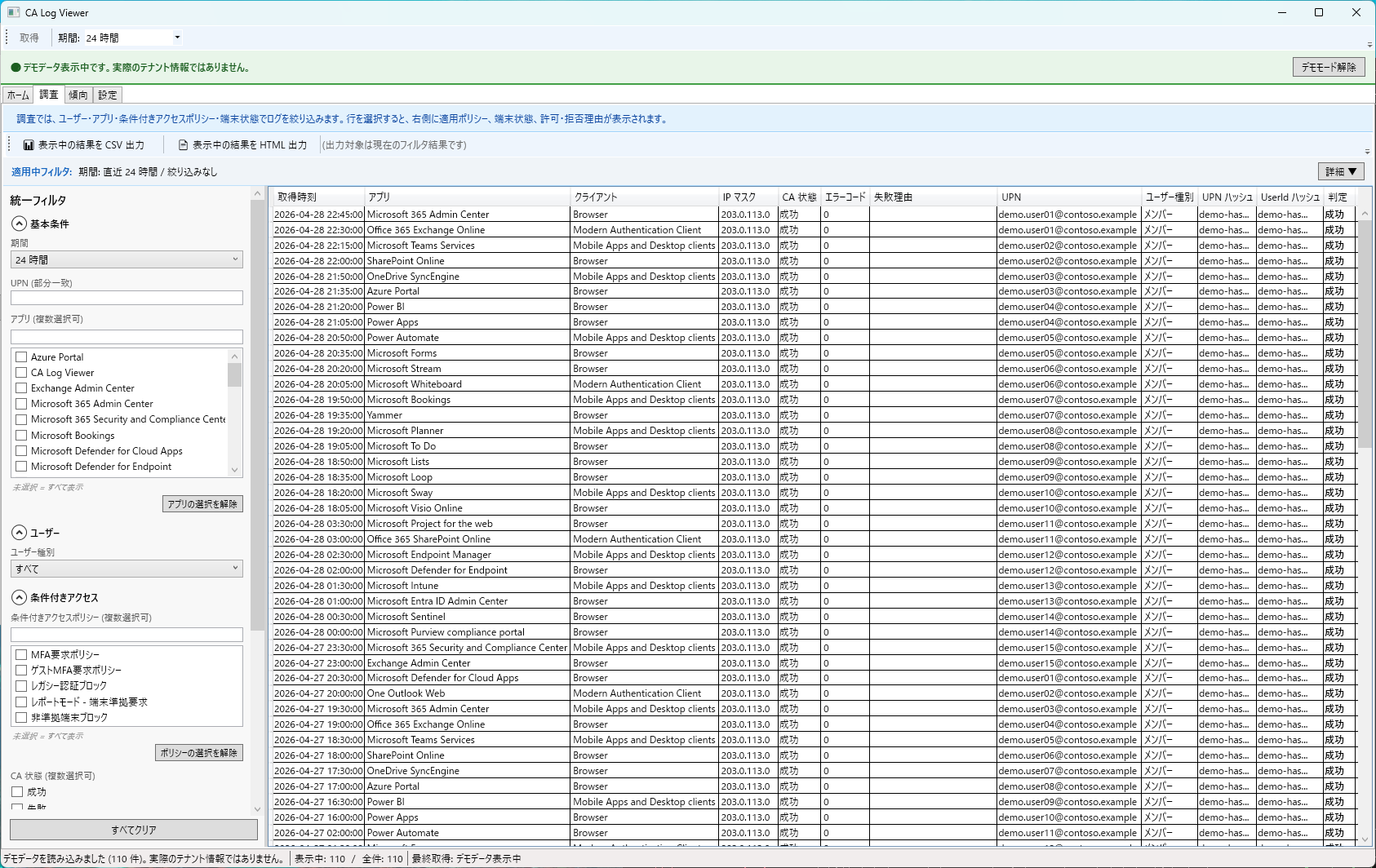
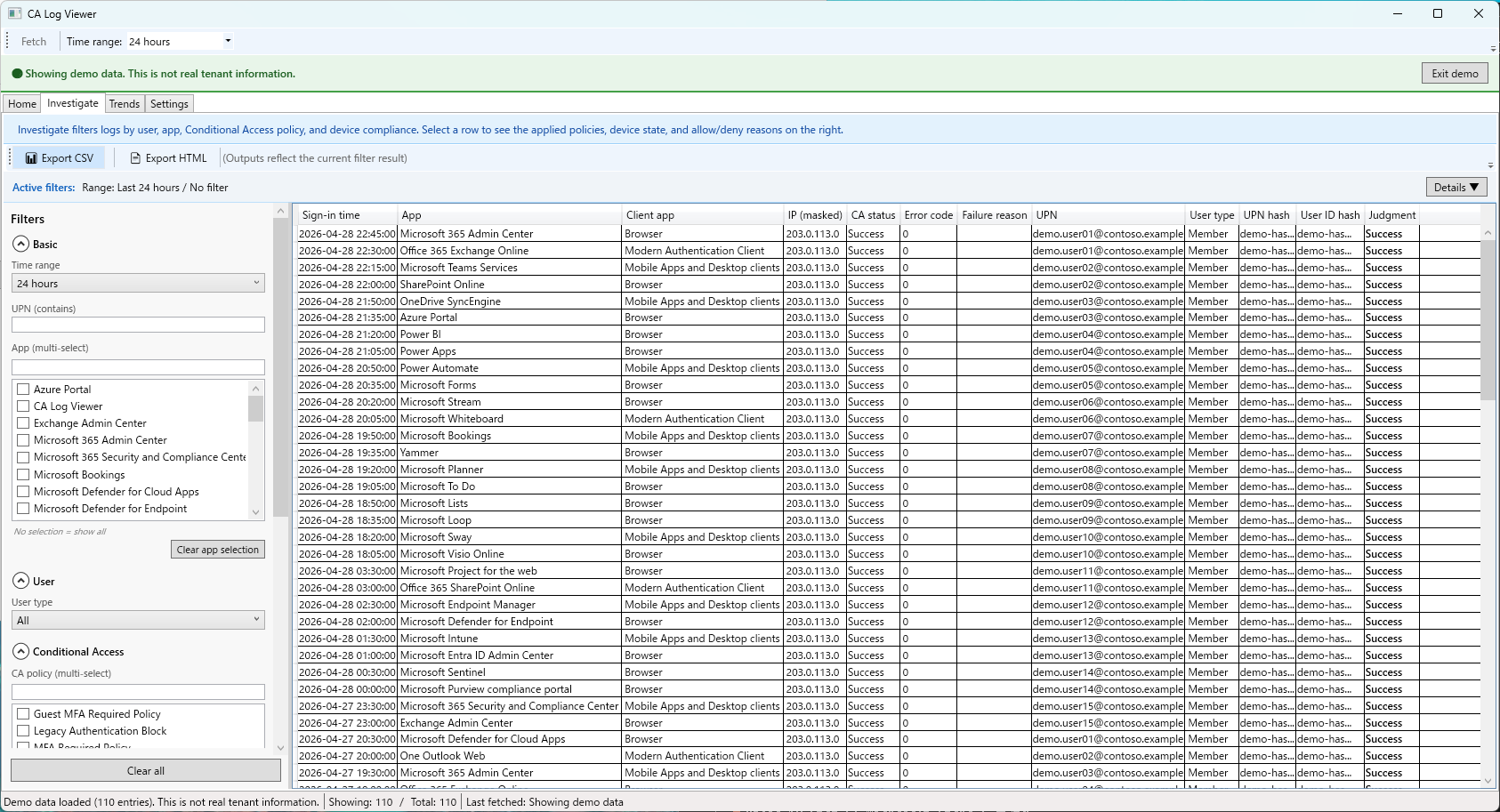
調査タブに切り替え、観点ごとにサインインを抽出。「設定漏れ」「想定外の許可」「これから本番化する範囲」を確認できます。
-
気になるサインインの詳細パネルで理由を確認
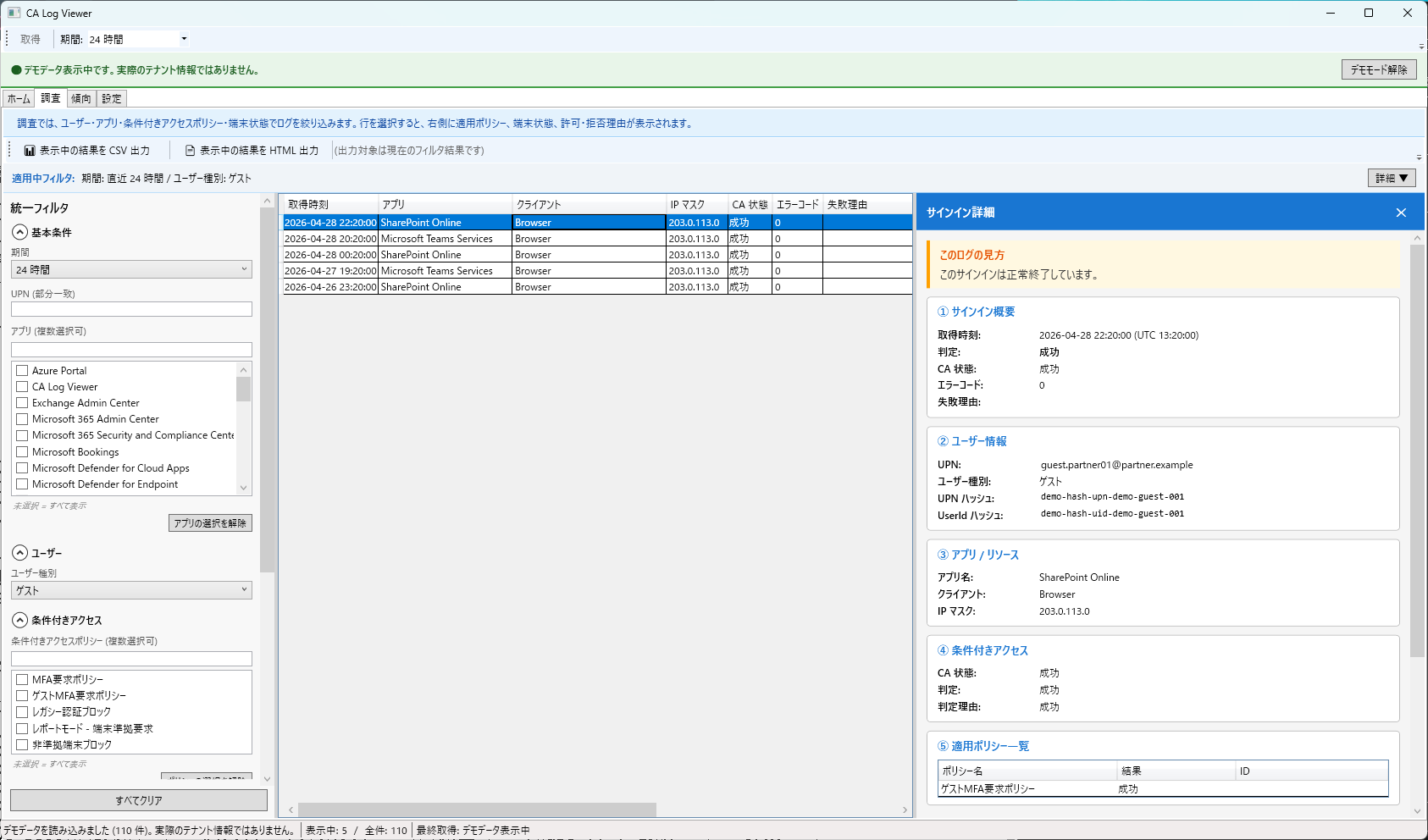
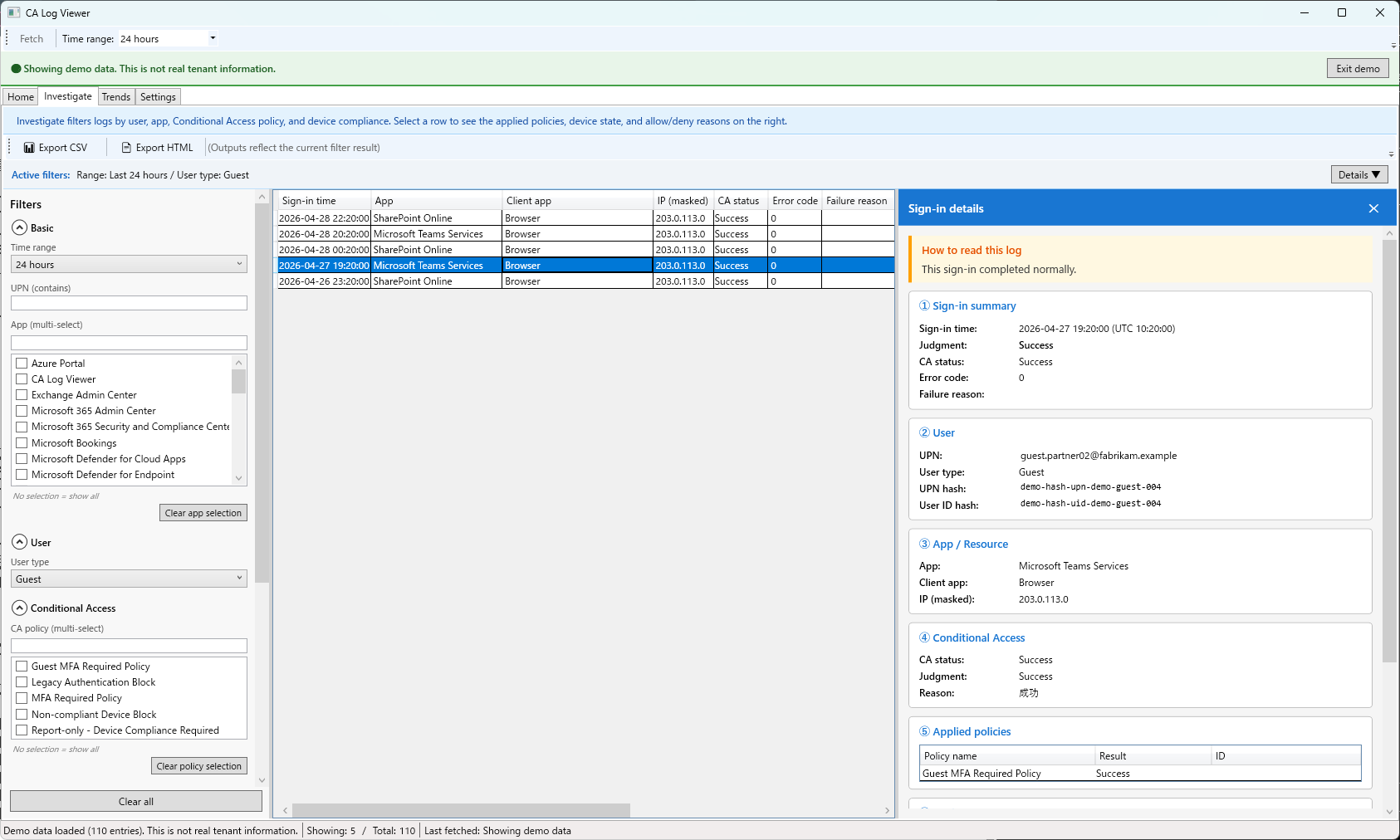
1 行クリックで、どのポリシーが・なぜ適用または未適用になったか、端末状態と許可拒否理由を含めて 1 画面で確認できます。
-
必要に応じて HTML レポートを出力
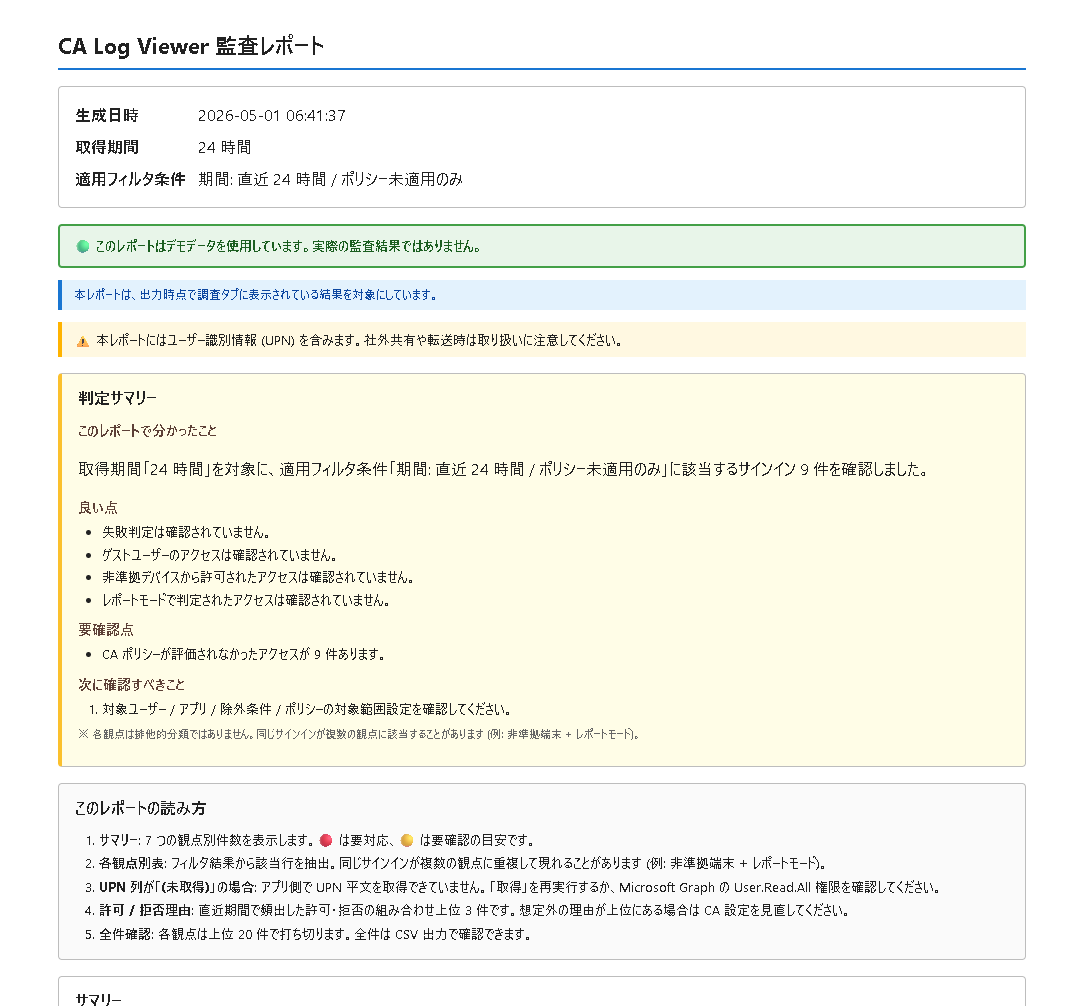
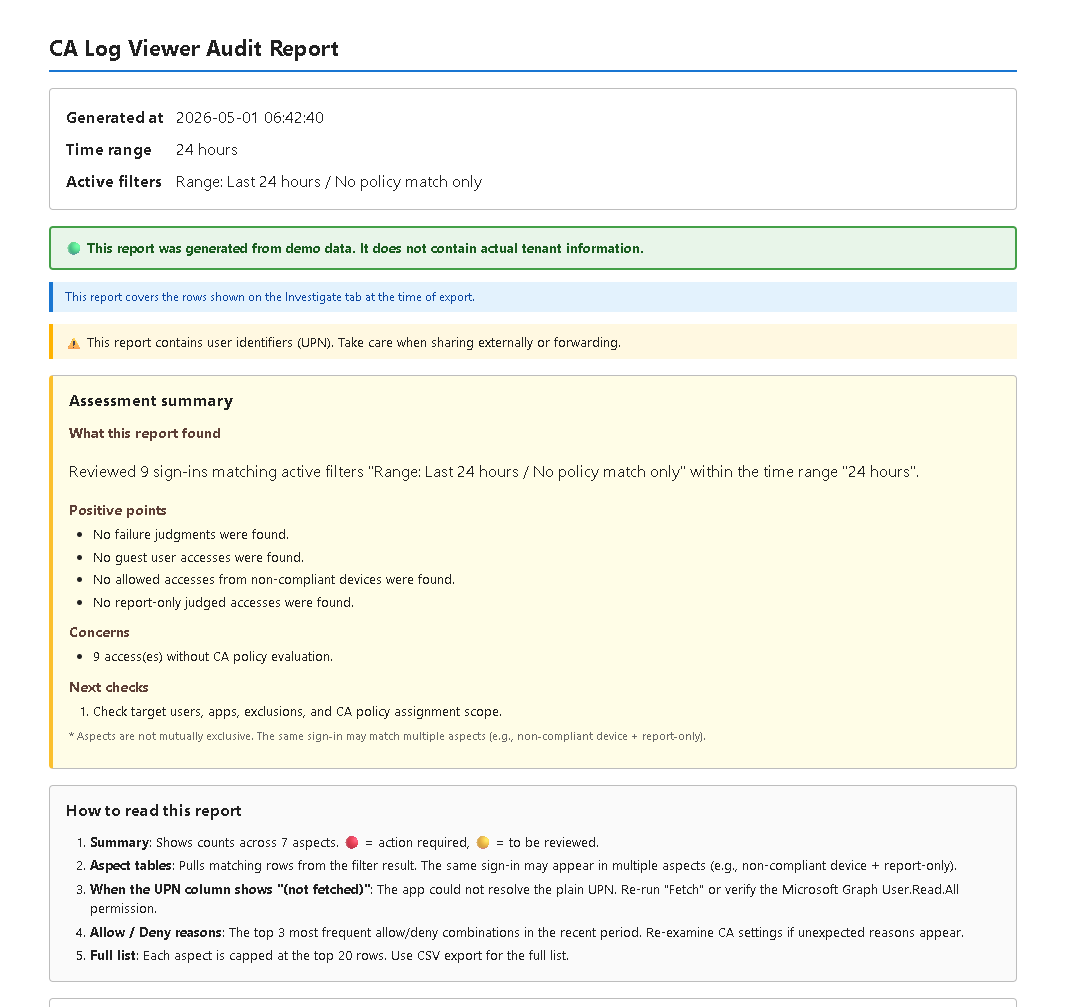
担当上長・監査・運用報告に渡せる形に、判定サマリーと観点別の代表ログをまとめてその場で出力できます。
Recommended workflow
-
Open Home to see "what to check today"
Use the anomaly banner and the quick-investigation buttons (No policy match / Report-only / Non-compliant allowed / Guests / Failed sign-ins) to focus on today's targets.
-
Review Non-compliant / Not applied / Report-only in sequence
Switch to the Investigate tab and pull sign-ins by each aspect — to spot setup gaps, unintended allows, and the upcoming production scope.
-
Open the detail pane on suspicious sign-ins
Click a row to see which policy applied (or didn't) and why — together with device state and allow/deny reasons in a single view.
-
Export an HTML report when needed
Hand a single file containing the assessment summary and per-aspect samples to your manager, auditor, or operations team.
すぐ試す
🪟 Microsoft Store
署名済 MSIX を Store からインストール
近日公開予定Try it now
🪟 Microsoft Store
Install the signed MSIX from the Store
Coming soon主な機能
統一フィルタ (複数選択 OR)
期間 / UPN / ユーザー種別 / アプリ / ポリシー / CA 状態 (4 値) / 判定 / 端末準拠 / 特殊フィルタ。複数選択は OR 表記で可視化。
詳細スライドインパネル
サインイン詳細 / ユーザー / アプリ / 条件付きアクセス / 適用ポリシー / 端末状態 / 許可 拒否理由 の 7 ブロック + 結論。
HTML レポート
Summary・Assessment・3 軸集約表 (ユーザー / アプリ / ポリシー、上位 20 + 他) ・観点別 4 セクション・許可 拒否理由・制約欄。
異常検知
件数急増・アプリ別偏りなどの「いつもと違う動き」を自動検知し、傾向タブから調査タブへ即座に遷移。
デモモード
110 件・6 シナリオのテストデータで起動。`*.example` ドメイン + RFC 5737 IP のみ、実テナント情報なし。
日本語 / English UI
UI / HTML レポート / 詳細パネル / 集約表 / フィルタすべて両言語対応。設定タブから切替 (再起動)。
Key features
Unified filter (multi-select OR)
Range / UPN / user type / app / policy / CA status (4 values) / judgment / device compliance / special filters. Multi-select is shown as OR.
Detail slide-in pane
7 blocks + conclusion: Sign-in summary / User / App / Conditional Access / Applied policies / Device / Allow & Deny reasons.
HTML report
Summary / Assessment / 3-axis aggregation (user / app / policy, top 20 + others) / 4 aspect sections / Allow & Deny reasons / Constraints.
Anomaly detection
Detects unusual activity such as count spikes or per-app skew, with one-click drill-down from Trends to Investigate.
Demo mode
Starts with 110 sample records / 6 scenarios. Uses only *.example domains and RFC 5737 IPs — no real tenant information.
Japanese / English UI
Full bilingual support across UI, HTML reports, detail pane, aggregations, and filters. Switch from Settings (restart required).
アプリの画面
日次運用で「どこから見れば早いか」をホーム画面に集約。詳細はワンクリックで掘り下げ、必要に応じて HTML レポートとして共有できます。
App screens
The Home tab summarizes "where to start today". Drill down with one click, and share results as an HTML report when needed.
このツールでできないこと
- 設定の変更はできません — 条件付きアクセスポリシーやユーザー設定の編集は行いません。設定変更は Microsoft Entra 管理センターから行ってください。
- アクセス制御は行いません — 本ツールはサインインログの可視化と分析のみを行い、アクセスの許可・拒否そのものに介入しません。
- Microsoft Graph 権限が不足している場合は結果が不完全になります — UPN・ポリシー名・ユーザー種別の解決には所定の 3 つの権限が必要です。詳細は はじめに をご確認ください。
What this tool does not do
- No configuration changes — The app does not edit Conditional Access policies or user settings. Make changes in the Microsoft Entra admin center.
- No access control — The app only visualizes and analyzes sign-in logs; it does not intervene with allow/deny decisions.
- Results may be incomplete without sufficient Microsoft Graph permissions — Resolving UPN, policy names, and user types requires three permissions. See Getting Started for details.
🔒 プライバシー方針 (要約)
Microsoft Graph 以外への外部送信なし。UPN 平文を DB に保存しません。詳細は プライバシーポリシー をご覧ください。
🔒 Privacy summary
No external transmission beyond Microsoft Graph. Plain UPNs are not stored in the database. See the Privacy Policy for details.
必要な Microsoft Graph 権限
本アプリは委任認証で動作し、3 つの読み取り権限のみを使用します: AuditLog.Read.All / Policy.Read.ConditionalAccess / User.Read.All。設定手順とトラブルシューティングは はじめに をご覧ください。
Required Microsoft Graph permissions
The app uses delegated authentication and three read-only scopes: AuditLog.Read.All / Policy.Read.ConditionalAccess / User.Read.All. See Getting Started for setup steps and troubleshooting.